Answer a public records request
Open Public records, under Residents. It appears when your town has turned on the records module and you have been given access to it.
Access to this module is set separately from your role. Who works on requests (managers only) gives each person one of: viewers read every request; handlers work the requests assigned to them; managers also assign requests and set up replies and people. Administrators are always managers.
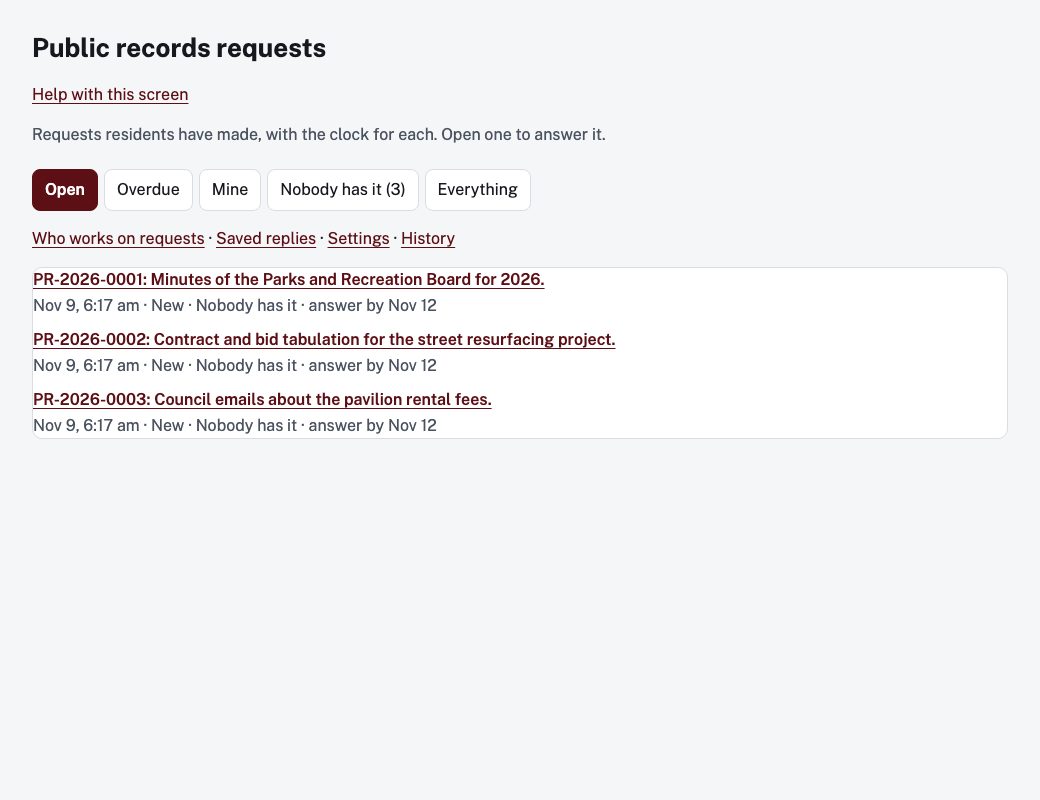
Find a request
The tabs are Open, Overdue, Mine, Nobody has it and Everything. Each row shows the tracking number, the start of the request, who has it, its department, when to answer by, and Overdue if it is late. Managers also see links to Who works on requests, Saved replies, Settings and History.
Work a request
Open a request by its tracking number. The top of the screen shows what was asked for, the dates, the format wanted, and who sent it. The sections, in order:
- Who has it (managers): choose Assign to and a Department, then Save.
- Records: Add a record (PDF, Word, Excel, CSV, text, JPG, PNG or ZIP) and choose Add. Nothing is sent to the requester until you release it. A warning appears if a PDF has accessibility problems; you can still release it.
- What is held back, and why (managers): enter The law that allows it, Why, in plain words (the requester reads this), Held back (part or all) and a Private note, then Record it.
- What has happened: the timeline of messages and events.
- Write to the requester: optionally Start from a saved reply and Use it, write the Message, choose a Then option for the status, and choose Send.
- Private note: Save note. The requester never sees it.
- Need more time: enter a New date to answer by and Why, then Take more time. The requester is told both.
Decide
Under Decide, choose Release the records (all of them), Release some, hold some back or Deny the request. Check the Message to the requester and choose Send decision. Releasing sends the records you added and emails the requester. Holding something back or denying needs a manager.
Change the status offers the moves that fit the request's current status, such as Mark acknowledged, Mark in progress, Waiting for the requester, Close and Withdrawn by the requester.