Approve a reservation request
Residents ask to use a pavilion, room or field from the website, and confirm their email address. Open Requests to reserve, under Reservations. It needs Editor, Approver or Administrator, and you can decide on the places that belong to your own departments (approvers and administrators can decide on all of them).
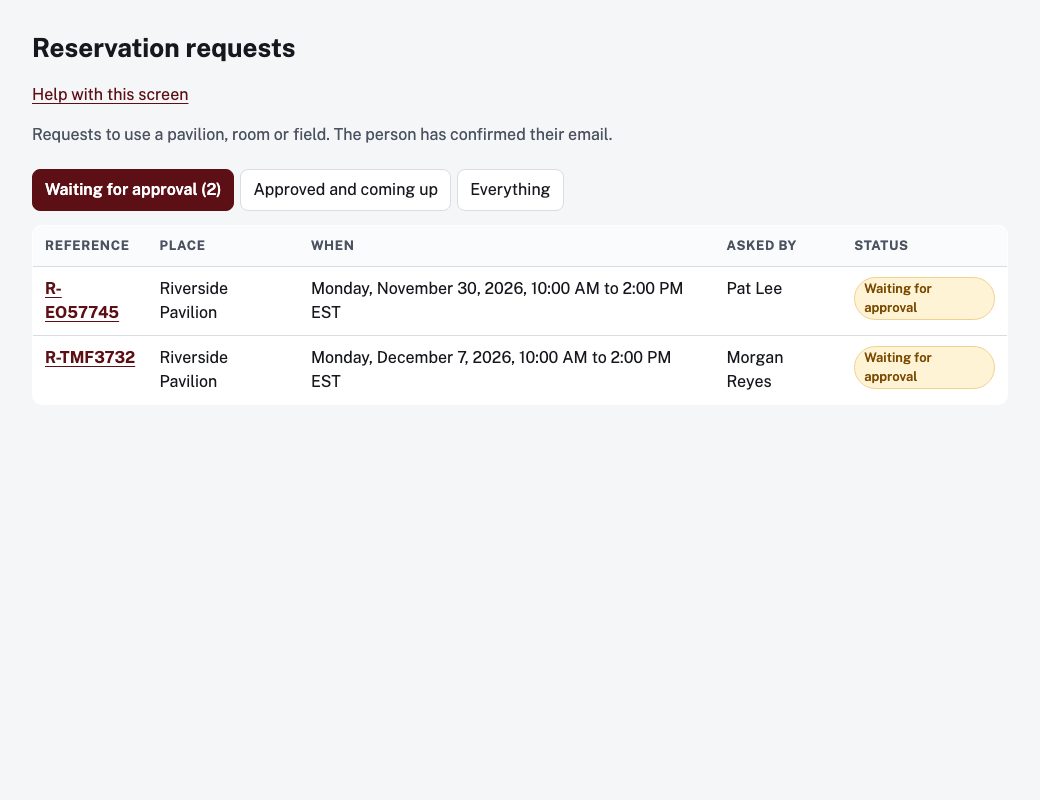
The queue
The tabs are Waiting for approval, Approved and coming up and Everything. The number beside Waiting for approval is how many need a decision. Choose a reference to open the request.
Decide
The request shows the place, when, the purpose, who asked and their email, and the fee if the place has one.
- Approve: add an optional Note to the requester (optional) (it goes in the approval email, for example where to get the key or who to pay) and choose Approve.
- Decline: enter a Reason for declining, which is sent to the requester, and choose Decline.
If the time overlaps a booking that is already approved, the screen says so and Approve is switched off: decline it or ask for another time. If other requests are waiting for the same time, they are listed under Others waiting for this time. Approving one means the others cannot be approved, and each needs a decline.
Cancel a booking
For a request or booking that has not ended yet, choose Cancel, add a Reason (optional), and confirm. The requester is emailed.
History at the bottom lists what happened and who did it.
Places to reserve
Approvers and administrators also see Places to reserve in the menu, where the places themselves are set up.